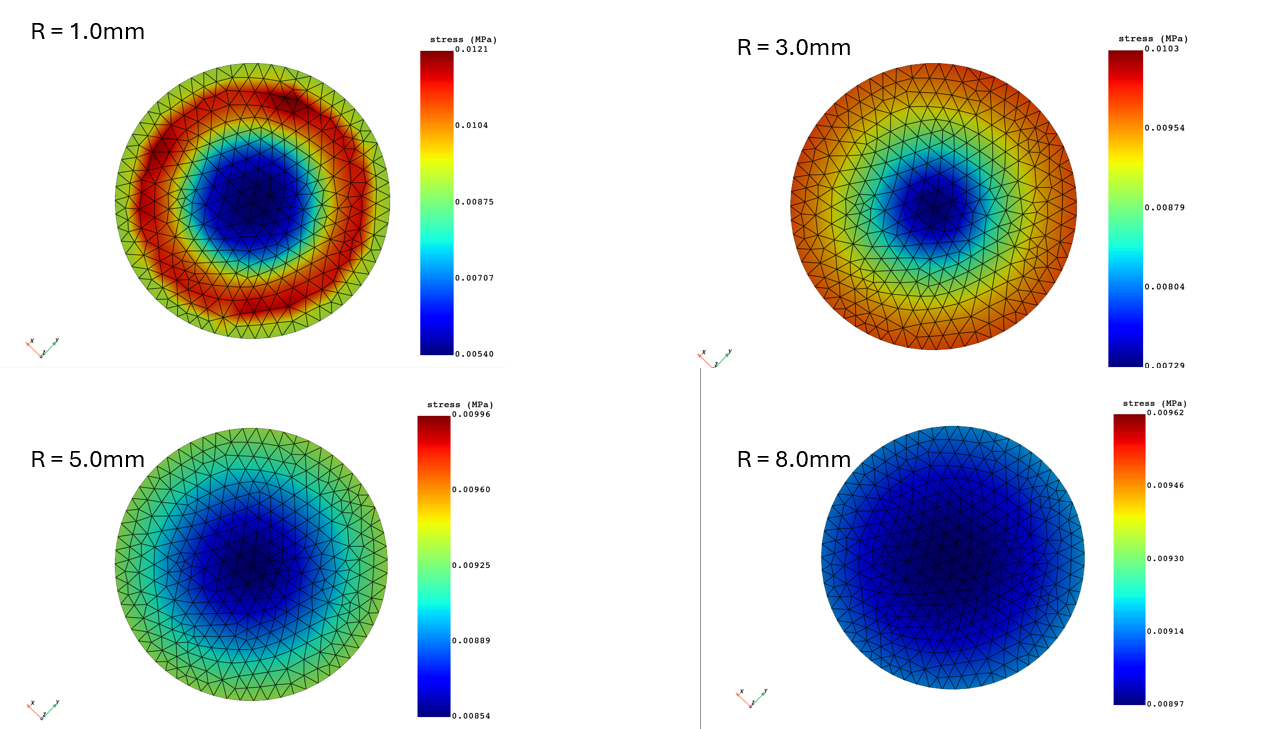
How do I generate an RBF mapping with PyDPF?
The RBF (Radial Basis Function) Filter is used to smooth or interpolate data across a mesh. It calculates the value at any given point by weighing the values of surrounding nodes based on their distance.
The Radius is the "smoothing scale" of the filter.
The Influence Box is a computational optimization (bounding box).
from ansys.dpf import core as dpf

from ansys.dpf.core.plotter import DpfPlotter


dpf.start_local_server(ansys_path=r"C:\Program Files\ANSYS Inc\v252")


rbf_ri = [1.0, 3.0, 5.0, 8.0]

inf_box = 25.0


s_rst = r"D:\…\file.rst"

s_model = dpf.Model(s_rst)

s_mesh = s_model.metadata.meshed_region


s = s_model.results.stress()

s.inputs.requested_location.connect("Nodal")

vm_s = dpf.operators.invariant.von_mises_eqv_fc(fields_container=s).eval()


t_rst = r"D:\…\file.rst"

t_model = dpf.Model(t_rst)


t_mesh = t_model.metadata.meshed_region


for rbf_r in rbf_ri:

    # RBF Mapping

    rbf_map = dpf.operators.mapping.prepare_mapping_workflow(

        input_support=s_mesh, output_support=t_mesh, filter_radius=float(rbf_r), influence_box=inf_box)

    rbf_map_wf = rbf_map.outputs.mapping_workflow()

    rbf_map_wf.connect("source", vm_s[0])

    rbf_map_wf_fc = rbf_map_wf.get_output("target", dpf.Field)

    print(rbf_map_wf_fc)


    pl = DpfPlotter()

    pl.add_field(rbf_map_wf_fc, t_mesh)

    # Plot the result.

    pl.show_figure(show_axes=True)