Can you provide a quick Getting Started with DPF in Mechanical?
Hi Pernelle and Paul,
Thank you for your help! The new code you provided is working perfectly.
br
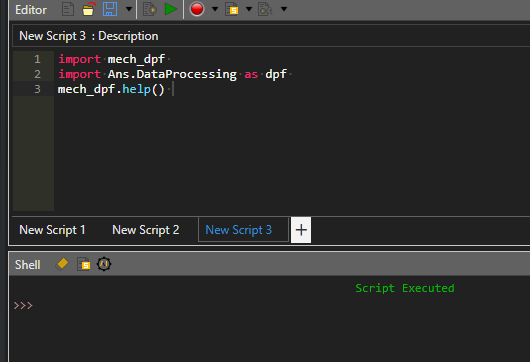
This post will be comprised of several examples with increasing difficulty. The starting point is to access the Mechanical Scripting Console: And then generate the DPF documentation by executing the following code:
import mech_dpf
import Ans.DataProcessing as dpf
my_output_path = (r"D:\DPF\Resources")
op = dpf.operators.utility.html_doc()
op.inputs.output_path.Connect(my_output_path)
op.Run()
This will generate a .html file in the specified folder. Use any web browser to open this file.
The second step is to understand how to open a result file and define the data sources. Check this post for further info: https://discuss.ansys.com/discussion/3075/opening-result-files-with-dpf-defining-datasources/p1?new=1 In the examples shown in the above post, we are retrieving the normal SX stress on node #1. Let's complexify things a little bit and compute the sum of SX + SY on node 1. We'll use three operators: one to retrieve SX, one to retrieve SY, and one to sum.
import mech_dpf
import Ans.DataProcessing as dpf
mech_dpf.setExtAPI(ExtAPI)
#Get path to result file
analysis = ExtAPI.DataModel.Project.Model.Analyses[0]
filepath = analysis.ResultFileName
#Data sources
dataSources = dpf.DataSources()
dataSources.SetResultFilePath(filepath)
#Scoping
scoping = dpf.Scoping()
scoping.Ids = [1]
scoping.Location = 'Nodal'
#Stress X direction
stressXOp = dpf.operators.result.stress_X()
stressXOp.inputs.data_sources.Connect(dataSources)
stressXOp.inputs.mesh_scoping.Connect(scoping)
sX = stressXOp.outputs.fields_container.GetData()
#Stress Y direction
stressYOp = dpf.operators.result.stress_Y()
stressYOp.inputs.data_sources.Connect(dataSources)
stressYOp.inputs.mesh_scoping.Connect(scoping)
sY = stressYOp.outputs.fields_container.GetData()
#Add Operator
addOp = dpf.operators.math.add()
addOp.inputs.fieldA.Connect(sX)
addOp.inputs.fieldB.Connect(sY)
addSxSy = addOp.outputs.field.GetData()
print(addSxSy.Data)
What if we want to use a named selection instead of grabbing the node number? We'll have to use another operator, to define a scoping on a named selection. Important note: when sent to the Mechanical solver, named selection will be in capital letters. So if you have a NS named "my_ns", to retrieve it in DPF, you'll have to use "MY_NS".
import mech_dpf
import Ans.DataProcessing as dpf
mech_dpf.setExtAPI(ExtAPI)
#Get path to result file
analysis = ExtAPI.DataModel.Project.Model.Analyses[0]
filepath = analysis.ResultFileName
#Data sources
dataSources = dpf.DataSources()
dataSources.SetResultFilePath(filepath)
# Model
model=dpf.Model(dataSources)
print(model.AvailableNamedSelections)
#Scoping on named selection
scoping_on_ns = dpf.operators.scoping.on_named_selection()
scoping_on_ns.inputs.requested_location.Connect('Nodal')
scoping_on_ns.inputs.named_selection_name.Connect('NODE1')
scoping_on_ns.inputs.data_sources.Connect(dataSources)
my_mesh_scoping = scoping_on_ns.outputs.mesh_scoping.GetData()
#Stress X direction
stressXOp = dpf.operators.result.stress_X()
stressXOp.inputs.data_sources.Connect(dataSources)
stressXOp.inputs.mesh_scoping.Connect(my_mesh_scoping)
sX = stressXOp.outputs.fields_container.GetData()
#Stress Y direction
stressYOp = dpf.operators.result.stress_Y()
stressYOp.inputs.data_sources.Connect(dataSources)
stressYOp.inputs.mesh_scoping.Connect(my_mesh_scoping)
sY = stressYOp.outputs.fields_container.GetData()
#Add Operator
addOp = dpf.operators.math.add()
addOp.inputs.fieldA.Connect(sX)
addOp.inputs.fieldB.Connect(sY)
addSxSy = addOp.outputs.field.GetData()
print(addSxSy.Data)
What if we want to plot this sum on the model ? Just copy/paste the code to a Python Result objects and make a few adaptations (basically to define what to plot) as follows:
def define_dpf_workflow(analysis):
    import mech_dpf
    import Ans.DataProcessing as dpf
    mech_dpf.setExtAPI(ExtAPI)
    #Get path to result file
    filepath = analysis.ResultFileName
    #Data sources
    dataSources = dpf.DataSources()
    dataSources.SetResultFilePath(filepath)
    # Model
    model=dpf.Model(dataSources)
    #Scoping on named selection
    scoping_on_ns = dpf.operators.scoping.on_named_selection()
    scoping_on_ns.inputs.requested_location.Connect('Nodal')
    scoping_on_ns.inputs.named_selection_name.Connect('MY_NS')
    scoping_on_ns.inputs.data_sources.Connect(dataSources)
    my_mesh_scoping = scoping_on_ns.outputs.mesh_scoping.GetData()
    #Stress X direction
    stressXOp = dpf.operators.result.stress_X()
    stressXOp.inputs.data_sources.Connect(dataSources)
    stressXOp.inputs.mesh_scoping.Connect(my_mesh_scoping)
    sX = stressXOp.outputs.fields_container.GetData()
    #Stress Y direction
    stressYOp = dpf.operators.result.stress_Y()
    stressYOp.inputs.data_sources.Connect(dataSources)
    stressYOp.inputs.mesh_scoping.Connect(my_mesh_scoping)
    sY = stressYOp.outputs.fields_container.GetData()
    #Add Operator
    addOp = dpf.operators.math.add()
    addOp.inputs.fieldA.Connect(sX)
    addOp.inputs.fieldB.Connect(sY)
    addSxSy = addOp.outputs.field.GetData()
    dpf_workflow = dpf.Workflow()
    dpf_workflow.Add(addOp)
    dpf_workflow.SetOutputContour(addOp)
    dpf_workflow.Record('wf_id', False)
    this.WorkflowId = dpf_workflow.GetRecordedId()
The plot will be on the named selection:
By default, DPF will only consider the results in the last time step. If you analysis contains several time steps, you'll have to define a time scoping and say at which time steps you want to retrieve/compute data. Using our example, the script becomes:
import mech_dpf
import Ans.DataProcessing as dpf
mech_dpf.setExtAPI(ExtAPI)
#Get path to result file
analysis = ExtAPI.DataModel.Project.Model.Analyses[0]
filepath = analysis.ResultFileName
#Data sources
dataSources = dpf.DataSources()
dataSources.SetResultFilePath(filepath)
# Model
model=dpf.Model(dataSources)
print(model.TimeFreqSupport)
# Using time scopings
time_scoping = dpf.Scoping()
number_sets = model.TimeFreqSupport.NumberSets
time_scoping.Ids = range(1, number_sets+1)
#Scoping on named selection
scoping_on_ns = dpf.operators.scoping.on_named_selection()
scoping_on_ns.inputs.requested_location.Connect('Nodal')
scoping_on_ns.inputs.named_selection_name.Connect('NODE1')
scoping_on_ns.inputs.data_sources.Connect(dataSources)
my_mesh_scoping = scoping_on_ns.outputs.mesh_scoping.GetData()
#Stress X direction
stressXOp = dpf.operators.result.stress_X()
stressXOp.inputs.data_sources.Connect(dataSources)
stressXOp.inputs.mesh_scoping.Connect(my_mesh_scoping)
stressXOp.inputs.time_scoping.Connect(time_scoping)
sX = stressXOp.outputs.fields_container.GetData()
#Stress Y direction
stressYOp = dpf.operators.result.stress_Y()
stressYOp.inputs.data_sources.Connect(dataSources)
stressYOp.inputs.mesh_scoping.Connect(my_mesh_scoping)
stressYOp.inputs.time_scoping.Connect(time_scoping)
sY = stressYOp.outputs.fields_container.GetData()
#Add Operator
addOp = dpf.operators.math.add_fc()
addOp.inputs.fields_container1.Connect(sX)
addOp.inputs.fields_container2.Connect(sY)
addSxSy = addOp.outputs.fields_container.GetData()
print(addSxSy)
print('Value at first step is: ' + str(addSxSy[0].Data))
print('Value at second step is: ' + str(addSxSy[1].Data))
To get plotted results on several time steps, you'll have to do two things:
The last thing that you might be interested in doing is customizing the detail's view of the Python Result: Here I've defined:
This is achieved by modifying the Property Provider of the Python Result: as follows:
def reload_props():
    this.PropertyProvider = None
    # Create the property instance
    provider = Provider()
    # Create a group named Group 1.
    group = provider.AddGroup("User inputs and outputs")
    scale_value = group.AddProperty("Scale Value", Control.Double)
    max_result = group.AddProperty("Max Res Value", Control.Double)
    max_result.CanParameterize = True
    max_result.ParameterType = ParameterType.Output
    this.PropertyProvider = provider
The code in the script itself will be:
def define_dpf_workflow(analysis):
    import mech_dpf
    import Ans.DataProcessing as dpf
    mech_dpf.setExtAPI(ExtAPI)
    #Get path to result file
    analysis = ExtAPI.DataModel.Project.Model.Analyses[0]
    filepath = analysis.ResultFileName
    #Data sources
    dataSources = dpf.DataSources()
    dataSources.SetResultFilePath(filepath)
    # Model
    model=dpf.Model(dataSources)
    #Scoping on named selection
    scoping_on_ns = dpf.operators.scoping.on_named_selection()
    scoping_on_ns.inputs.requested_location.Connect('Nodal')
    scoping_on_ns.inputs.named_selection_name.Connect('MY_NS')
    scoping_on_ns.inputs.data_sources.Connect(dataSources)
    my_mesh_scoping = scoping_on_ns.outputs.mesh_scoping.GetData()
    #Stress X direction
    stressXOp = dpf.operators.result.stress_X()
    stressXOp.inputs.data_sources.Connect(dataSources)
    stressXOp.inputs.mesh_scoping.Connect(my_mesh_scoping)
    sX = stressXOp.outputs.fields_container.GetData()
    #Stress Y direction
    stressYOp = dpf.operators.result.stress_Y()
    stressYOp.inputs.data_sources.Connect(dataSources)
    stressYOp.inputs.mesh_scoping.Connect(my_mesh_scoping)
    sY = stressYOp.outputs.fields_container.GetData()
    #Add Operator
    addOp = dpf.operators.math.add()
    addOp.inputs.fieldA.Connect(sX)
    addOp.inputs.fieldB.Connect(sY)
    addSxSy = addOp.outputs.field.GetData()
    # Scale
    scale_value = this.GetCustomPropertyByPath("User inputs and outputs/Scale Value").Value
    scale_op = dpf.operators.math.scale()
    scale_op.inputs.field.Connect(addSxSy)
    scale_op.inputs.ponderation.Connect(scale_value)
    scaled_res = scale_op.outputs.field.GetData()
    # Get max value over field
    min_max = dpf.operators.min_max.min_max() # operator instantiation
    min_max.inputs.field.Connect(scaled_res)
    my_field_max = min_max.outputs.field_max.GetData()
    my_max = my_field_max.Data[0]
    # Output
    this.GetCustomPropertyByPath("User inputs and outputs/Max Res Value").Value = my_max
    # Plot
    dpf_workflow = dpf.Workflow()
    dpf_workflow.Add(scale_op)
    dpf_workflow.SetOutputContour(scale_op)
    dpf_workflow.Record('wf_id', False)
    this.WorkflowId = dpf_workflow.GetRecordedId()
I am trying to find maximum principal stress in named selection. I found this reference for max operator (https://dpf.docs.pyansys.com/version/stable/operator_reference_load.html). Do I need to import additional libraries for this? When I added lines like below, I get error "Traceback (most recent call last): TypeError: LinkableOutput[Field] is not callable' for line "s1_Max = opMax.outputs.field_min()". #Maximum Principal Stress stress1Op = dpf.operators.result.stress_principal_1() stress1Op.inputs.data_sources.Connect(dataSources) stress1Op.inputs.mesh_scoping.Connect(my_mesh_scoping) s1 = stress1Op.outputs.fields_container.GetData()
opMax = dpf.operators.min_max.min_max_by_entity() # operator instantiation opMax.inputs.fields_container.Connect(s1) s1_Max = opMax.outputs.field_min() print(s1_Max.Data)
@Hrishikesh.Panchanwagh , your question is not related to the topic of the post. Please create a new post for this. Thank you
Hi Pernelle,
thanks for the nice quick start guide. I tried to generate the documentation htlm file following your code using the scripting editor in mechanical.
import mech_dpf
import Ans.DataProcessing as dpf
my_output_path = (r"D:\DPF\Resources")
op = dpf.operators.utility.html_doc()
op.inputs.output_path.Connect(my_output_path)op.Run()
Unfortunaltely i end up with the error message:
MissingMemberException: attribute 'html_doc' of 'namespace#' object is read-only: line 4
Thanks and best regards,
Simon
Hi Simon, glad you found this guide useful. I am surprised by the error message you are getting. Which version of Ansys are you using ? @Ayush Kumar , @Paul Profizi , does this ring a bell ?
Hi @Pernelle Marone-Hitz, hi @SimonH, yes this is an issue which I just fixed in the version under development. The operator has been moved to the "Ans.Dpf.Documentation" plugin in DPF 25R2, which was not loaded by default by Mechanical in 25R2. You can try to load it explicitly and then try to instantiate and run the operator.
Axtually, one should use print(mech_dpf.help()) to print the path