This question comes up quite often for how to plot arbitrary data onto a mechanical model in prep, before a solve happens. There are a number of ways to post process results and see things after a model is solved (command snippets, ACT objects, Python Results, User-Defined Results), but in prep there are less options.
Answer
One of the best is to use an ACT app and specifically the callback: getnodalvaluesfordisplay
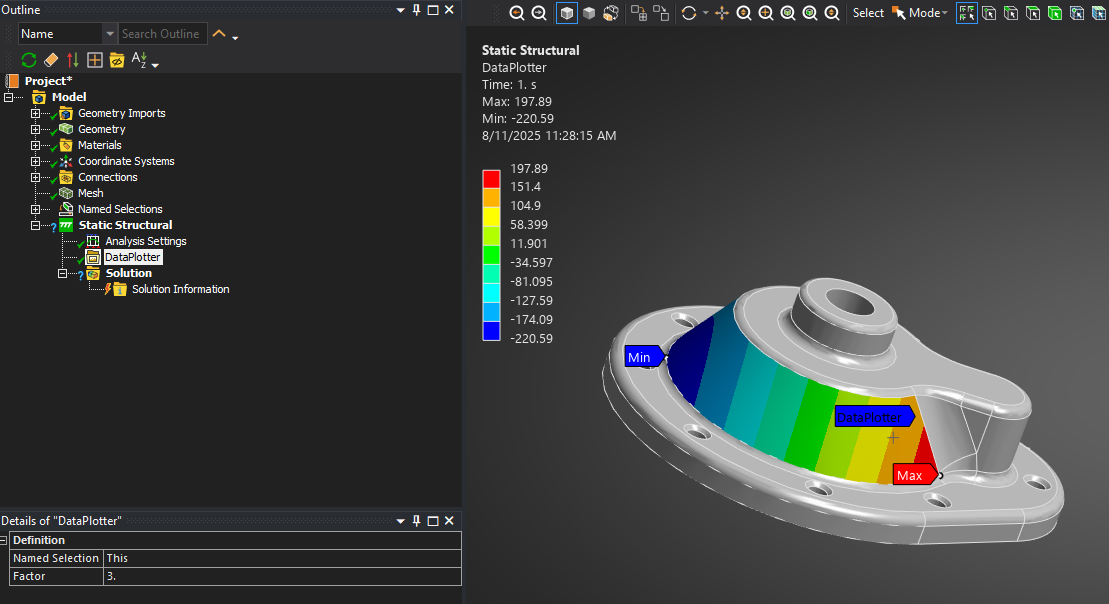
This, as it is named, is a callback that happens each time an object is shown (activated for graphics), and it is given the Ids of the primary scoping property. The user-defined python method then returns a list of values, the same size as the list of nodes. These values are plotted on a contour plot, similar to an imported load object.
The functional result is a user can plot any arbitrary data, from any source, onto the mesh in mechanical. This could be simply for visualization, but the most common use case would be to take these values and apply them as a load via MAPDL commands, again using the ACT framework to load with the right values per the contours.
The simple example below simply plots the node X coordinate onto the selected faces, allowing also a multiplication "Factor" as indicated by the user-input property.
def _GetDataValues(Obj,Ids):
    F = Obj.Properties["Factor"].Value
    Values = [(Obj.Analysis.MeshData.NodeById(Id).X)*F for Id in Ids]
    return Values

def DataPlotter_GetNodalValuesForDisplay(Obj,Ids):
    return _GetDataValues(Obj, Ids)

def DataPlotter_OnGenerate(Obj,Func):
    NumSteps=5
    for i in range(NumSteps):
        Func(NumSteps,"Step: "+ str(i))
    return True