Hello,
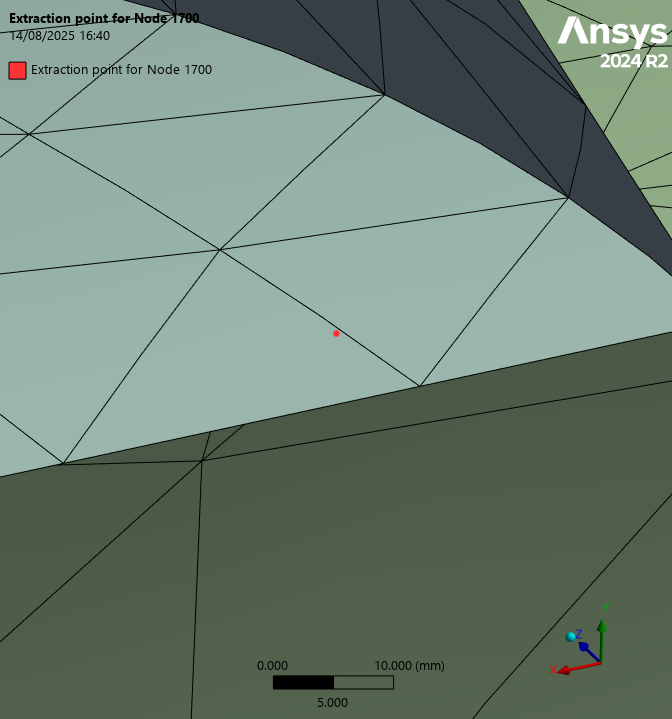
I'm working in Ansys Mechanical using the "Ans.DataProcessing" module to extract results of a FE analysis. In particular, I'm trying to interpolate displacements at a generic target point having coordinates (X, Y, Z) in a shell FE model, which does not correspond to the location of a FE node (see the red dot in the attached figure for insance).
The target point coincides with the meshed surface from a pure graphical point of view.
My goal is to replicate what a manual Results Probe would do, providing me the results at the desired location.
In order to interpolate displacement results at the desired target point, I'm using the following script which leverages DPF capabilities of the "mapping.on_coordinates()" operator. I defined a DPF Field to store the (X, Y, Z) coordinates of the target point. Such coordinates are defined in millimeters since the active units in Mechanical for my analysis are "StandardNMM" (i.e. N/mm/MPa)
# Get the active analysis and result file; define the data sources
data_sources = dpf.DataSources(Model.Analyses[0].ResultFileName)
model = dpf.Model(data_sources)

# Define the displacement operator
disp_op = dpf.operators.result.raw_displacement()
disp_op.inputs.mesh.Connect(model.Mesh)
disp_op.inputs.data_sources.Connect(data_sources)

# Define the coordinates of the generic points
target_coordinates = [target_point]
# Create a DPF Field to hold the target coordinates
coord_field = dpf.FieldsFactory.Create3DVectorField(len(target_coordinates))
for i, coord in enumerate(target_coordinates): coord_field.Add(i + 1, coord)

# Create the mapping operator to interpolate displacements
mapping_op = dpf.operators.mapping.on_coordinates()
mapping_op.inputs.fields_container.Connect(disp_op.outputs.fields_container.GetData())
mapping_op.inputs.coordinates.Connect(coord_field)
mapping_op.inputs.mesh.Connect(model.Mesh)
mapping_op.inputs.create_support.Connect(True)
mapping_op.inputs.use_quadratic_elements.Connect(True)

# Get the interpolated displacement results
interpolated_disp_container = mapping_op.outputs.fields_container.GetData()[0]
Even though the target points coincide graphically with the meshed surface, most of the times I use this script, the interpolated_disp_container returns "0 elementary data", as follows:
DPF raw_displacement_1.s Field
  Location: Nodal
  Unit: mm
  0 entities
  Data: 6 components and 0 elementary data
I assume this could be due to a mismatch between the location of the target point and the meshed surface, however the point seems exactly coincident with the surface from a graphical standpoint.
Is there maybe something I am missing in the script?
For instance, my DPF Field is defined as follows with "Location: Nodal" and without any specified "Unit", is this to be set-up diffrently?
DPF  Field
  Location: Nodal
  Unit:
  1 entities
  Data: 3 components and 1 elementary data
I thank you in advance for your advice and interest.